AI Solution

Accounts Payable Automation Sydney, Melbourne, Brisbane, Perth, Adelaide

With every bill checked before anyone approves it.

Supplier bills captured from the inbox, matched to purchase orders, checked for duplicates and changed details, routed to the right approver and drafted in your accounting system, with the exceptions in one queue.

More about this service

Built around Xero, MYOB, QuickBooks or your ERP and the way your accounts team already works. People approve every bill and every payment; the system does the reading, matching and chasing. Scoped before we start, and you own the code.

  • AU-wide Australian team · no offshore
  • Approved By your people, every bill
  • Drafts Nothing paid by the system
  • Yours Code, rules and data
Australian owned and operated

Built here. Your data stays here.

  • No offshore development. Everything is written by our own team in Australia. Nothing is subcontracted overseas.
  • Your data stays onshore. Hosted in Australia, on infrastructure you own, under Australian law.
  • Every state, not just ours. Perth, Melbourne, Sydney, Brisbane, Adelaide and everywhere between.
In short

What accounts payable automation does, and what it does not

Accounts payable automation handles the work between a supplier invoice arriving and a bill sitting in your accounting system ready to pay: capture, reading, purchase order matching, duplicate and supplier checks, approval routing and the draft bill itself. Bills that pass move on; bills that do not wait in one exception queue with the reason shown.

Read more

It does not pay suppliers, post on its own judgement or give accounting advice. Your delegations decide who approves, your rules decide how bills are coded, and your team makes the payments. Reading the invoice is one step, built on our AI document processing capability; this page is about the whole accounts payable process around it.

Try it yourself · Document reading

Doxy

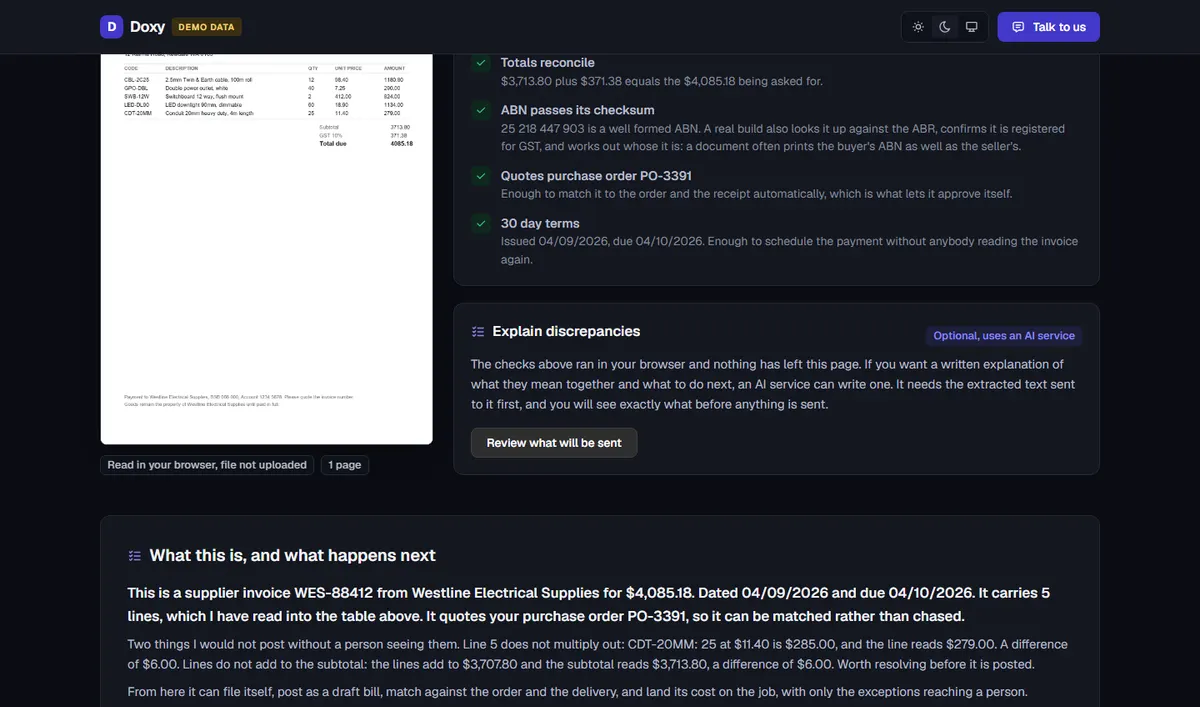
Open an invoice, purchase order or delivery docket and watch it become a header, lines and totals, checked before anything is posted.

  • Fields and line items read from the PDF
  • Totals, line sums and the ABN checked
  • Read in your browser; the file is not uploaded
Ask for a Doxy demo Demo access is by invitation. Fictional business data.
Doxy demo: a supplier invoice read into checked fields with totals reconciled
Demo data
The Workflow

Every step of accounts payable, with a person at the decisions

Six stages we build, each shown with an example. Most businesses start with capture, checks and draft bills, then add purchase order matching and approval routing.

Invoices captured from the inbox, not retyped

Supplier invoices arrive in an accounts inbox, a supplier portal or a scanned pile. Each one is picked up, read and turned into a header, lines, GST and totals, whatever the supplier's layout.

The reading itself is our intelligent document processing capability. On this page it is one step in the accounts payable process, and the steps after it are where the time goes.

Matched to the purchase order and what was received

Where you raise purchase orders, each bill is matched to its order, and to the goods receipt or delivery docket where one exists. Quantities, prices and lines are compared, and anything outside the tolerance you set is held.

Part deliveries, back orders and freight lines are handled by rules agreed with your accounts team, not guessed by the model.

Duplicates and validation before anyone approves

Each bill is checked against what you already hold: the same invoice number from the same supplier, the same amount and date under a different number, an ABN that does not match, a supplier that is not on file, or bank details that differ from the supplier record.

Changed bank details are never accepted from an invoice. They are flagged for a person to confirm with the supplier through a known contact, because that is how invoice fraud usually works.

Approval routed to the right person

Approval rules follow your delegations: by supplier, cost centre, project, job or amount band. The approver sees the bill, the matched order and any flags in one place, and approves or queries it from email or a phone.

Reminders go out when a bill sits too long, and every approval is recorded with who approved it and when.

Draft bills in Xero, MYOB, QuickBooks or the ERP

Approved bills are created as drafts, or awaiting payment where you choose, in your accounting system or ERP, coded to the account, tax code, tracking category or job you agreed. The original PDF is attached.

Posting and payment stay with your team. The system prepares the bill and the payment batch can be reviewed as usual; it does not release money.

One exception queue instead of a cluttered inbox

Anything that does not pass lands in a single queue: price differences, missing orders, possible duplicates, unknown suppliers, unreadable scans. Each item shows the bill, the reason it stopped and the next step.

Your team clears the queue, and the decisions they make become rules where that is safe, so the same exception is not raised every month.

Limits and controls

Automation for the checking, people for the money

These controls are part of every accounts payable build. They are what make it safe to rely on.

People approve every bill

Nothing moves to the ledger without the approval your delegations require. The system prepares, checks and routes; your team decides.

No payments released

The system does not pay suppliers or release payment batches. Payments are made by your team in your bank or accounting system, as now.

No autonomous accounting decisions

Coding, tax codes and tolerances follow rules you agree. Where a rule does not cover a bill, it goes to a person, not to the model's best guess. It gives no tax or accounting advice.

Bank detail changes held

A change in supplier bank details is never taken from an invoice or email. It is flagged and confirmed with the supplier through a known contact.

A full audit trail

Every bill keeps its original file, what was read, the checks it passed or failed, who approved it and when, and what was sent to accounting.

Hosting stated up front

We offer Australian hosting where the architecture and the model provider's terms allow it, and tell you during scoping where each part runs. See AI data privacy in Australia.

Which one do you need?

Accounts payable automation, document processing or built-in capture

Three ways to stop typing supplier bills. The right one depends on your volumes, whether you raise purchase orders and how many other documents you handle.

Criterion Accounts payable automation (this page) AI document processing Built-in bill capture
What it covers The whole bill process: capture, matching, checks, approval, draft bill, exceptions Reading any document type into structured data Reading bills into your accounting product
Purchase order matching Two-way or three-way, with your tolerances Only if built into the workflow Varies by product and plan
Approval routing By supplier, job, cost centre or amount Not the focus Usually basic
Systems written to Xero, MYOB, QuickBooks or your ERP Any system, including CRM and databases That accounting product only
Best when Accounts payable takes real time each week and has rules worth enforcing Many document types beyond invoices need reading Volumes are low and there are no orders to match

Built-in capture means the bill reading included with some accounting products or add-ons. What it covers varies by product and plan.

For reading invoices, forms, contracts and other documents in general, see AI document processing. For how it works under the hood, read AI document processing explained. Once it is live, managed AI services watch reading quality, failed postings and the exception queue, and AI governance and controls cover access, approvals and audit records.

Systems we connect

Built around the systems you already run

We read and write through each product's API. What each connection can do depends on the product and your plan, confirmed during scoping.

Xero, MYOB and QuickBooks

Draft bills, suppliers, accounts, tax codes and tracking read and written through each API. See our Xero, MYOB and QuickBooks services.

Job systems

Supplier and subcontractor bills matched to jobs and purchase orders in Simpro or ServiceM8.

Outlook and Gmail inboxes

Invoices collected from the accounts inbox, with approval requests and queries sent by email. See AI email and approval workflows.

Capture tools you already use

If you already capture with a tool such as Rossum, we build the matching, approval and exception steps around it. See Rossum integration.

Supplier and order data

Supplier records, contracts, price lists and order history used to validate each bill, from whichever system holds them.

Have a job like this one?

Call 0425 531 127 or Send us the details

How We Build It

From your current process to bills that check themselves

Rules first, then automation. Your team runs alongside the system before relying on it.

  1. Map your current process

    How bills arrive, who approves what, where orders and receipts live, and where the time and the errors are today. We collect a sample of real bills.

  2. Agree the rules

    Matching tolerances, approval delegations, coding rules and what counts as an exception, written down with your accounts team.

  3. Build capture and checks

    Reading, supplier matching, PO matching, duplicate and bank detail checks, tested on your own sample bills.

  4. Connect approval and accounting

    Approval routing, the exception queue, and draft bills written to Xero, MYOB, QuickBooks or the ERP.

  5. Run alongside your team

    For an agreed period your team checks the system's work against their own before relying on it.

  6. Monitor and refine

    Exception reasons, approval delays and read failures are reviewed, and rules are tightened where it is safe to do so.

What people ask about accounts payable automation

What is accounts payable automation?

Accounts payable automation takes supplier bills from arrival to a draft in your accounting system with far less typing. Invoices are captured and read, matched to purchase orders and receipts, checked for duplicates and supplier details, routed to the right approver, and created as draft bills in Xero, MYOB, QuickBooks or your ERP. Anything that does not pass goes to an exception queue for your team.

Does accounts payable automation pay suppliers automatically?

No. The system prepares and checks bills and routes them for approval, but it does not release payments or make accounting decisions on its own. Every bill is approved by the people your delegations name, and payments are made by your team as they are now. Changed supplier bank details are always held for a person to confirm.

How does AP automation match invoices to purchase orders?

Each bill is matched to its purchase order, and to the goods receipt or delivery docket where you record one. Supplier, lines, quantities and prices are compared within tolerances agreed with your accounts team. Bills that match are routed for approval; bills with a difference, a missing order or an unexpected freight line are held in the exception queue with the reason shown.

Can accounts payable automation work with Xero, MYOB, QuickBooks or our ERP?

Yes. Approved bills are written as drafts through the accounting system's API, coded to the accounts, tax codes, tracking categories or jobs you agree, with the original file attached. ERPs such as NetSuite and Business Central, and job systems such as Simpro, can be connected too. What each connection can do depends on the product and your plan, which we confirm during scoping.

How is accounts payable automation different from AI document processing?

AI document processing is the general capability of reading any document into structured data. Accounts payable automation uses that capability for one job, then adds the steps that make it a finished process: purchase order matching, duplicate and supplier checks, approval routing, draft bills in your accounting system and an exception queue. If you need many document types read, start with document processing.

Tell us how supplier bills reach your ledger today

Roughly how many bills arrive, how they arrive, whether you raise purchase orders, who approves what, and which accounting system or ERP you use. We will reply with where we would start and what we need from you to scope it.

Prefer a quick chat? Call 0425 531 127. We answer it ourselves, in Australia.

Kasun Wijayamanna, founder of HELLO PEOPLE

Kasun Wijayamanna, founderYou deal with Kasun from scope to delivery. No account managers and no offshore handoff.