Service

Maintenance Management Software Sydney, Melbourne, Brisbane, Perth, Adelaide

With every asset serviced on time and its history one scan away.

Custom maintenance management software for businesses that look after their own plant, equipment, vehicles or buildings. An asset register, service schedules that raise work orders when they fall due, and a full maintenance history for every asset.

More about this service

Technicians record the work on a phone or tablet, offline where sites need it, and costs connect to the accounting and job systems you already use. Australian team, no offshore development.

  • Onshore Australian team, no offshore
  • Yours You own the code and the data
  • Connected Accounting and job systems
  • Offline Where your sites need it
Australian owned and operated

Built here. Your data stays here.

  • No offshore development. Everything is written by our own team in Australia. Nothing is subcontracted overseas.
  • Your data stays onshore. Hosted in Australia, on infrastructure you own, under Australian law.
  • Every state, not just ours. Perth, Melbourne, Sydney, Brisbane, Adelaide and everywhere between.
The short answer

What maintenance management software is, and who it is for

Maintenance management software is a system that keeps a register of your assets, schedules their servicing, raises work orders when a service is due or something breaks, and keeps the history of every job done on each asset. It is for businesses that maintain their own plant, equipment, vehicles or buildings.

Read more

Most businesses start with a spreadsheet of service dates and a whiteboard of breakdowns. That works until the list is long enough that services are missed, history lives in someone's inbox, and nobody can say what a machine has cost to keep running.

Plenty of off-the-shelf products do this well, and if one fits, use it. A custom build earns its place when your assets, intervals or approvals do not fit a standard product, or when maintenance has to sit closely with the accounting and job systems you already run.

What We Build

From the asset register to the maintenance report

The asset register, service schedules, work orders, inspections, mobile capture and reporting. We build the parts your maintenance needs and leave out the rest.

Every asset, where it is and what state it is in

The asset register is the centre of the system: plant, equipment, vehicles, buildings and the parts inside them, each with its location, make, model, serial number, warranty, manuals and the people responsible for it.

Assets can sit inside other assets, so a pump belongs to a plant room that belongs to a site. That structure is what lets you see maintenance history and cost at whatever level you need.

Custom software development

Planned maintenance that raises itself

Service schedules are set per asset or asset type, by date, by usage such as hours or kilometres, or both. When a service comes due, the system raises the work order and tells the right person, so planned maintenance does not depend on someone remembering a spreadsheet.

Overdue services are visible straight away, and the schedule moves forward from the date the work was actually done, not the date it was meant to be.

Planned and breakdown work in one queue

Work orders come from three places: a schedule that has come due, an inspection that found a fault, or someone reporting a breakdown. Each one is assigned, prioritised, worked and closed with notes, photos, parts and time against the asset.

Where reactive jobs for customers already run through a job management system, maintenance work orders can sit beside it or feed into it rather than duplicating it.

Job management software

Condition checks that feed the maintenance plan

Inspections and pre-start checks are recorded against the asset. A failed item can raise a work order on the spot, and repeated failures on the same asset show up in its history rather than being written up as new each time.

If inspections are the main job, with detailed checklists and branded reports, our inspection app page covers that in more depth.

Inspection app

Capture the work where the asset is

Technicians open the work order on a phone or tablet, scan a QR code on the asset to bring up its history, record what they did, and attach photos and parts used. Where sites have poor signal, the app can work offline and send everything when the connection returns.

Offline capture adds work to the build, so it is included where your sites need it rather than by default.

Mobile app development

Maintenance history and cost, connected to the rest of the business

Reports show what was serviced, what is overdue, which assets fail most often and what each one has cost in labour and parts. That is the evidence for deciding when to repair and when to replace.

Parts, purchase costs and invoices can connect to your accounting system, and work orders to your job system, so nobody types the same thing twice.

Dashboard and reporting software
Capabilities catalogue

Maintenance and asset management software, in detail

Everything below can be part of your maintenance management software, from a register and service schedule for one workshop to planned maintenance across many sites. If your assets are not listed, ask.

Kinds of maintenance management software we build

  • Asset maintenance software built around your own asset types and service intervals
  • Preventive maintenance software that raises work orders when a service is due
  • Planned maintenance scheduling by date, hours, kilometres or cycles
  • Plant and equipment maintenance software for workshops and yards
  • Facilities maintenance software for buildings, plant rooms and common areas
  • Fleet maintenance records for vehicles and mobile plant
  • A maintenance work order system for planned and breakdown work

The asset register

  • Assets grouped by site, building, area and parent asset
  • Make, model, serial number, warranty and manuals on every asset
  • QR codes on assets to open their record and history
  • Asset status, condition rating and expected replacement date
  • Import from an existing spreadsheet or system, checked and reconciled

Work and history

  • Work orders from schedules, inspections and breakdown reports
  • Parts and labour recorded against each work order
  • Full maintenance history per asset, kept with the asset when it moves
  • Photos and signatures on completion
  • Offline capture for sites with poor signal, where needed

Connections

Which one do you need?

Maintenance management, job management, inspections or compliance

These four overlap, and many businesses need more than one. The difference is where each one starts. Choose the one that matches the work you do most, then connect the others to it.

Maintenance management software

Starts from the asset. Planned services on a schedule, plus the breakdowns and inspection faults that come up between them, all recorded in the asset's history. Best when you look after your own plant, equipment, vehicles or buildings.

Job management software

Starts from the customer. Enquiries, quotes, scheduling, dispatch and invoicing for work you do for other people.

Inspection app

Starts from the checklist. Detailed inspection forms, photos, signatures and a finished report on site.

Compliance and safety software

Starts from the obligation. Hazards, incidents, inductions and compliance registers.

Try it yourself · Job management

Jexa

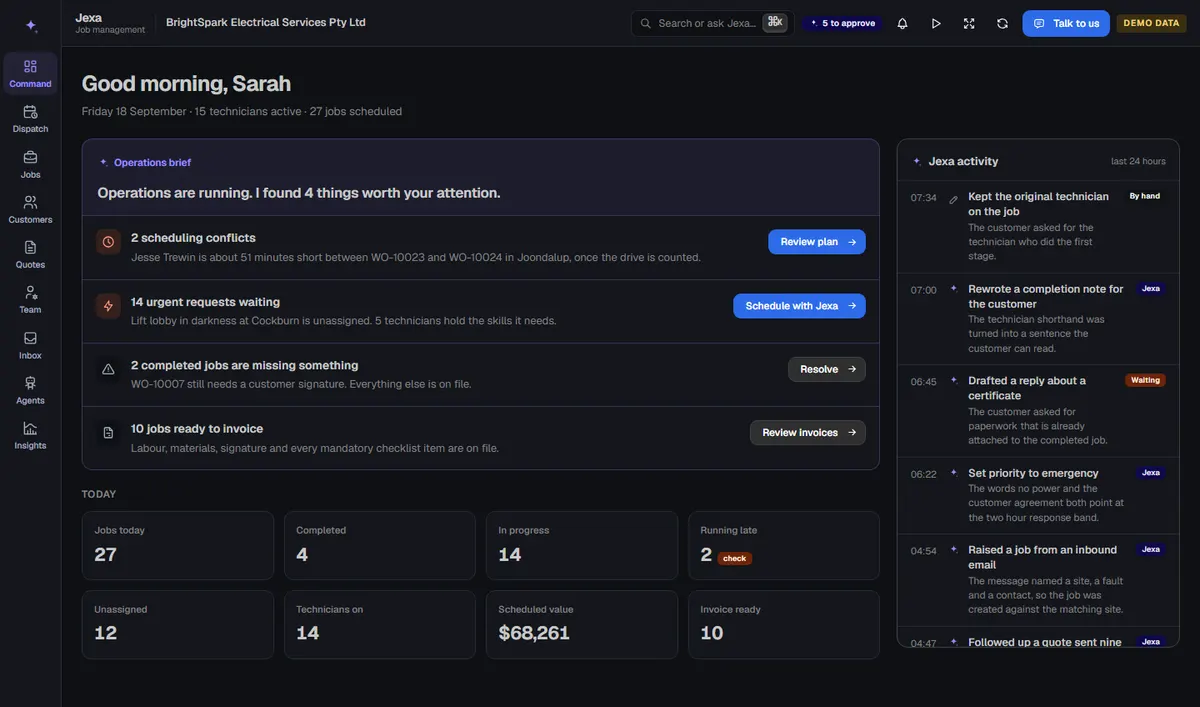
Job management for a trades business, from the first enquiry to dispatch, completion and invoice, with the exceptions brought to the top.

  • A dispatch board for fifteen technicians
  • Scheduling conflicts and late jobs surfaced early
  • Quotes, jobs and invoices in one place
Ask for a Jexa demo Demo access is by invitation. Fictional business data.
Jexa demo: the operations brief and today's job measures for a fictional electrical business
Demo data
Custom or off the shelf?

Custom maintenance management software or an off-the-shelf CMMS

An off-the-shelf CMMS is the right answer for many businesses, and we will say so when it is. Custom software is worth considering when the product forces your maintenance into a shape it does not have, or when it cannot talk to the systems the rest of the business runs on.

Criterion Off-the-shelf CMMS Custom maintenance software
Your assets and intervals Standard asset types, configured to fit Built around how your assets are serviced
Getting started Sign up and configure Discovery, design and a staged build
Other systems The connectors the product offers Connected to the accounting and job systems you use
Ongoing cost Per user, per month A build, then optional support
Your data and code Held by the vendor You own the code and every record
Best fit Standard maintenance that matches the product Maintenance that does not fit a standard product

Limits: we build software, we do not set your service intervals or certify that maintenance meets a standard. Those stay with your engineers, manufacturers and regulators, and the software records what they decide.

How We Deliver

From your asset list to the first work order

We start with how maintenance runs today, design the register and schedules with you, then build in stages so the team is using the core system early.

  1. Walk Through

    We look at how maintenance runs today: the assets, the service intervals, how breakdowns are reported, where history is kept and what management needs to see.

  2. Register and Design

    We set out the asset structure, the schedules, the work order flow and the screens technicians will use. You approve the design before building starts.

  3. Core Build

    The asset register, schedules and work orders come first, so the team can start recording real maintenance early.

  4. Data and Connections

    We import your existing asset list and history, reconcile it, and connect the system to your accounting, job or inventory software where that is in scope.

  5. Field Testing

    Technicians use it on real assets, including at sites with poor signal if offline capture is part of the build, and we adjust before full rollout.

  6. Launch and Support

    We train your team and look after the system from there, adding asset types, schedules and reports as the business changes. See software maintenance.

Examples

What maintenance management software can look like

Illustrative examples of common setups, not client results. Each build follows the assets and intervals of the business it is for.

Example: mobile plant and vehicles

A civil contractor services excavators by engine hours and utes by kilometres. Readings entered at pre-start raise the next service automatically, and breakdowns reported from site land in the same work order queue.

Example: building services across sites

A facilities team looks after air conditioning, lifts, fire equipment and pumps across several buildings. Each asset has its own schedule and history, and contractors close their work orders with photos from a phone.

Example: production equipment

A manufacturer replaces a planned maintenance spreadsheet with an asset register for its production lines. Spare parts are drawn from stock against each work order, and cost per machine shows which ones are due for replacement.

What owners ask about maintenance management software

What does maintenance management software do?

Maintenance management software keeps a register of your assets, schedules their servicing, raises work orders when a service is due or something breaks, and records the full maintenance history of each asset. Technicians capture the work on a phone or tablet, and managers see what is overdue and what each asset costs to keep running.

Should we build custom maintenance management software or buy a CMMS?

Buy an off-the-shelf CMMS if your maintenance fits a standard product and you are comfortable paying per user. Custom maintenance management software makes sense when your assets, service intervals or approvals do not fit the template, or when maintenance must connect closely to the accounting and job systems you already use. We will tell you if a product would serve you better.

How is maintenance management software different from job management software?

Maintenance management software starts from the asset: planned servicing on a schedule and the history of everything done to it. Job management software starts from the customer: enquiries, quotes, dispatch and invoicing for work done for other people. Many businesses need one or the other; some need both, connected so work orders and jobs do not get entered twice.

Can asset maintenance software work offline on site?

Yes, where your sites need it. The asset maintenance app can store work orders, readings, photos and signatures on the device and send them when signal returns. Offline capture adds work to the build, so we include it for sites with poor coverage rather than by default.

Can maintenance management software connect to our accounting system?

Yes. Parts, purchases and labour costs from maintenance work orders can flow to accounting systems such as Xero or MYOB, and work orders can connect to job systems such as Simpro or ServiceM8. Which connections are worth building depends on how your costs and jobs are handled today, and that is settled during discovery.

Tell us how maintenance runs today

What assets you look after, how services are scheduled now, how breakdowns are reported and where the history is kept. We will come back with a plain-English view of what would fit, including when an off-the-shelf product is the better answer.

Prefer a quick chat? Call 0425 531 127. We answer it ourselves, in Australia.

Kasun Wijayamanna, founder of HELLO PEOPLE

Kasun Wijayamanna, founderYou deal with Kasun from scope to delivery. No account managers and no offshore handoff.